Review Comments (0) Screenshots (4) Questions & Answers (0) Votes (3) Awards (6) Wiki  
(3)
LizardSystems
3.5.0.92
lizardsystems.com
Shareware
$29.95  Purchase
419 people
Download Find MAC Address

2.37 MBDownloaded 3836 times

This software was checked for viruses 2 months ago and was found to contain no viruses.
Click here to see antivirus report.
 
Video tutorial for Find MAC Address 3.4
Frame
Video tutorial for Find MAC Address 2.0
Frame
This video tutorial has been acquired from Downloadtube.com

Review

This is official description

Find MAC Address is a tool for finding the MAC address of computers on the network.
This tool is an easy way to find the MAC address of a local or remote computer on the network. Select the target and method and find the MAC address of a remote computer on the network.
With Find MAC Address, you can find the MAC address of your or remote computer and also of any computer within the specified range of IP addresses. Unlike similar software, Find MAC Address can find the MAC addresses of computers using four methods (ARP, NetBios, NetAPI, WMI, SNMP).
- Getting the MAC address of the local computer.
- Getting the MAC address of one remote computer either by its name or IP address.
-Getting the MAC addresses of all computers on the network.
 
The following review written by one of the Software Informer contributors applies to version 2.0

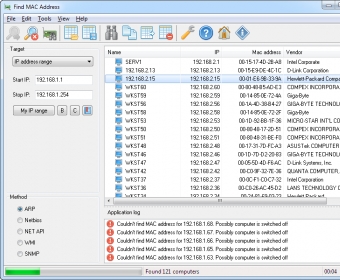
Find MAC Address is a nice utility for network administrators. It is also really good for people who have several computers on the network and need some information about them. Find MAC Address carries out a rather simple task, but it allows you to get a lot of information. It can identify the MAC address of any computer connected to your network. The application uses 4 methods for gathering information about your computers: ARP, Netbios, NetAPI and WMI. So, chances are that you will be able to find the information even if the usual methods fail. You can find the MAC address of a computer by searching for an IP address or a computer's name. The application's graphical user interface is pretty straightforward. You check the service you want to use for your search and input the name or IP address of your computer, and you get a list of results on the right panel. Also, you can even tell Find MAC Address to search for every computer on your network and give you the MAC addresses of them all.
  • Simple and easy to use.
  • None.

Reviewed by: José Fernández

Reviewer rating:

Reviewed: 3 years ago

Report a wrong version Report a wrong program title Suggest a correction

Screenshots

Main window Main window Main Main Preferences Preferences Check state Check state

Latest comments


There are no comments, be the first one!
Add new comment

E-mail Address:

Password:

Register now »

Forgot password?

Sign in with:
Download Software Informer Client
Copyright © 2012, Informer Technologies, Inc. About| Privacy and terms| Help| Feedback & Support| Partners program